Turn competitor intelligence into conversion-ready outreach in seconds. The Pitch Copilot creates personalized templates for LinkedIn, email, and sales calls based on the exact frustrations your prospect is experiencing - and then lets you refine them through conversation.
What Is the Pitch Copilot?
When someone complains about your competitor, the Pitch Copilot analyzes:
Their specific pain points from the review
Aggregated pain point patterns across all reviews for that competitor product
Your product's relevant strengths
The company's context and industry
The reviewer's role
Then it creates ready-to-customize outreach that directly addresses their frustrations and positions your solution as the answer.
What makes it a "Copilot"? Unlike traditional AI generators, you can have a conversation with it. Ask for changes, request different tones, get variations - all without spending additional credits.
How to Access It
From any alert detail page, you'll see a "Generate sales pitch" button at the bottom.
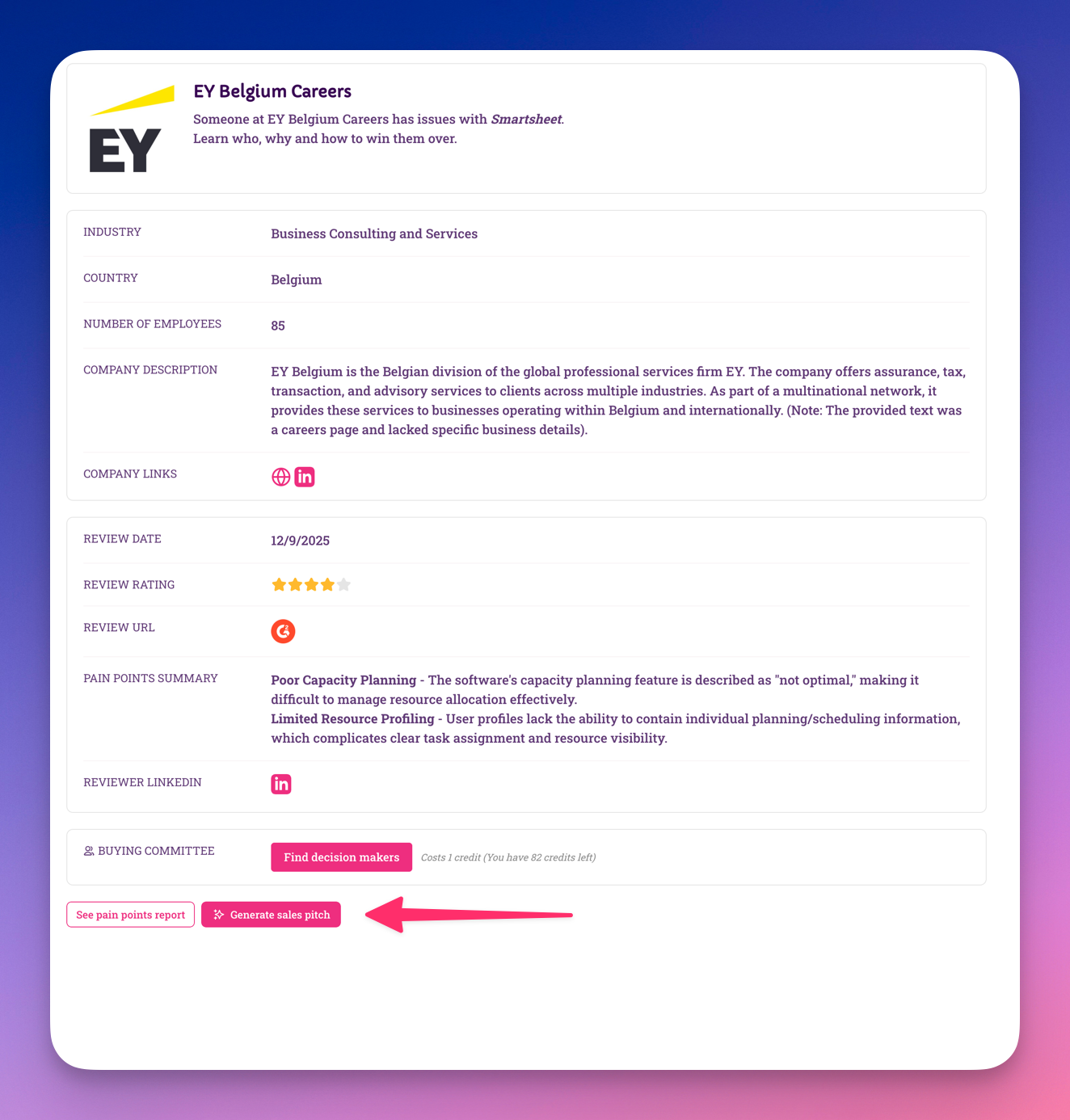
Important: You must first unlock the reviewer's LinkedIn profile before you can generate a pitch. This ensures the outreach is personalized to the right person with the right context.
Cost: Generating a pitch uses 1 credit - but only for the initial generation. After that, you can refine, iterate, and request variations for free through the conversational interface.
The Generation Process
Step 1: Choose Your Outreach Formats
Select which templates you want to create:
Email template - Cold email that addresses their pain points
LinkedIn message - Connection request or direct message for social outreach
Sales call talking points - Structured conversation guide with objection handling
You can select one, two, or all three. The AI generates each format optimally for its channel.
Step 2: Define Your Product's Strengths
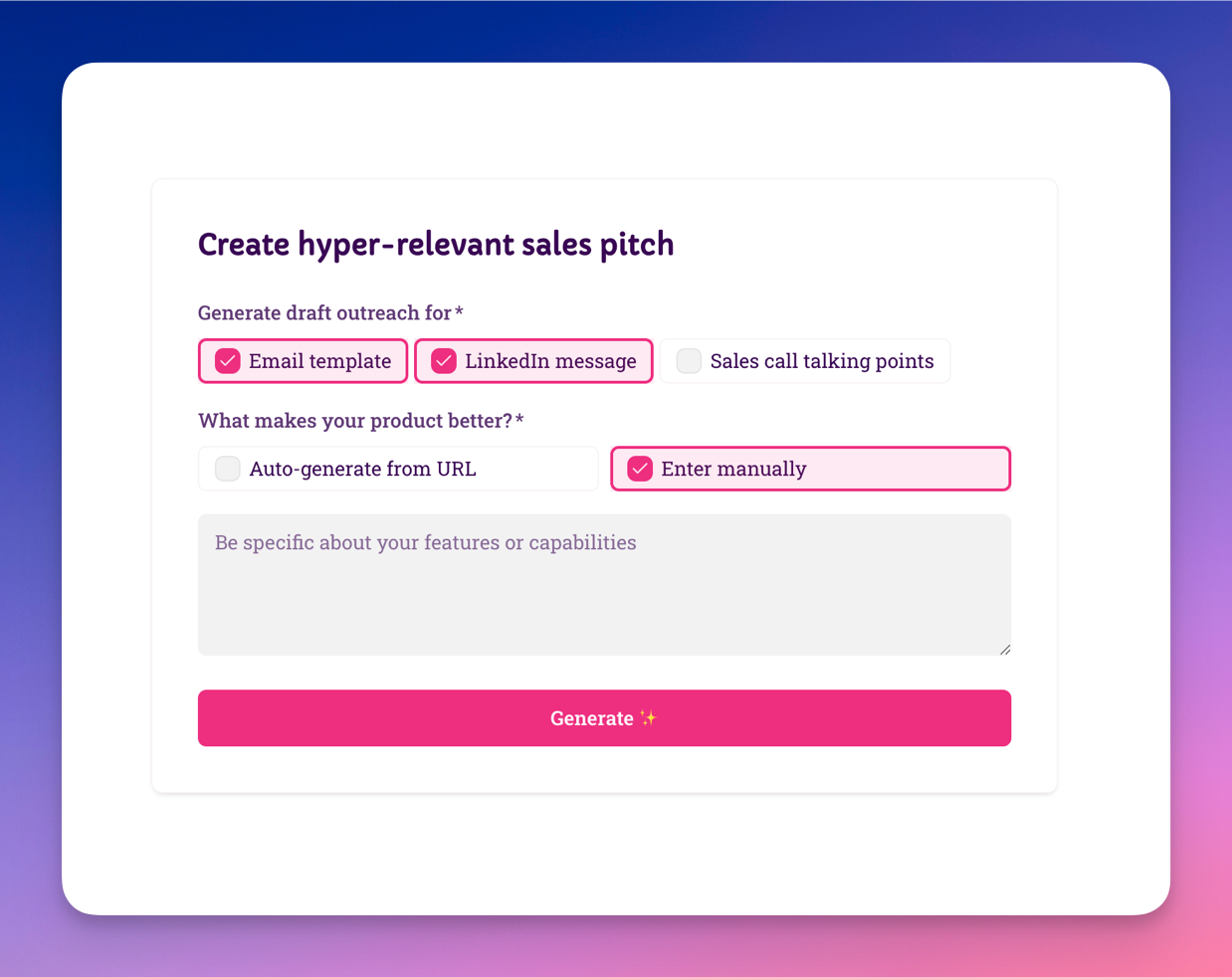
You have two options:
Auto-generate from URL (Recommended)
Paste your website or product page URL. The AI scans your site to understand your value proposition, features, and differentiators. Quick and accurate for most use cases.
Enter manually
Type in specific features or capabilities that solve the exact issues mentioned in the review. Use this when:
You have features not yet on your website
You want to emphasize specific differentiators
The alert requires highly customized positioning
Pro tip: Be specific. Instead of "Better integrations," write "Native Salesforce + HubSpot sync with bi-directional data flow." More detail = better pitches.
Step 3: Generate
Click the "Generate ✨" button. The AI processes the pain points from this specific review, broader patterns from all reviews about this competitor, your product strengths, and the company context to create personalized outreach.
Generation typically takes 10-15 seconds.
What You'll Get
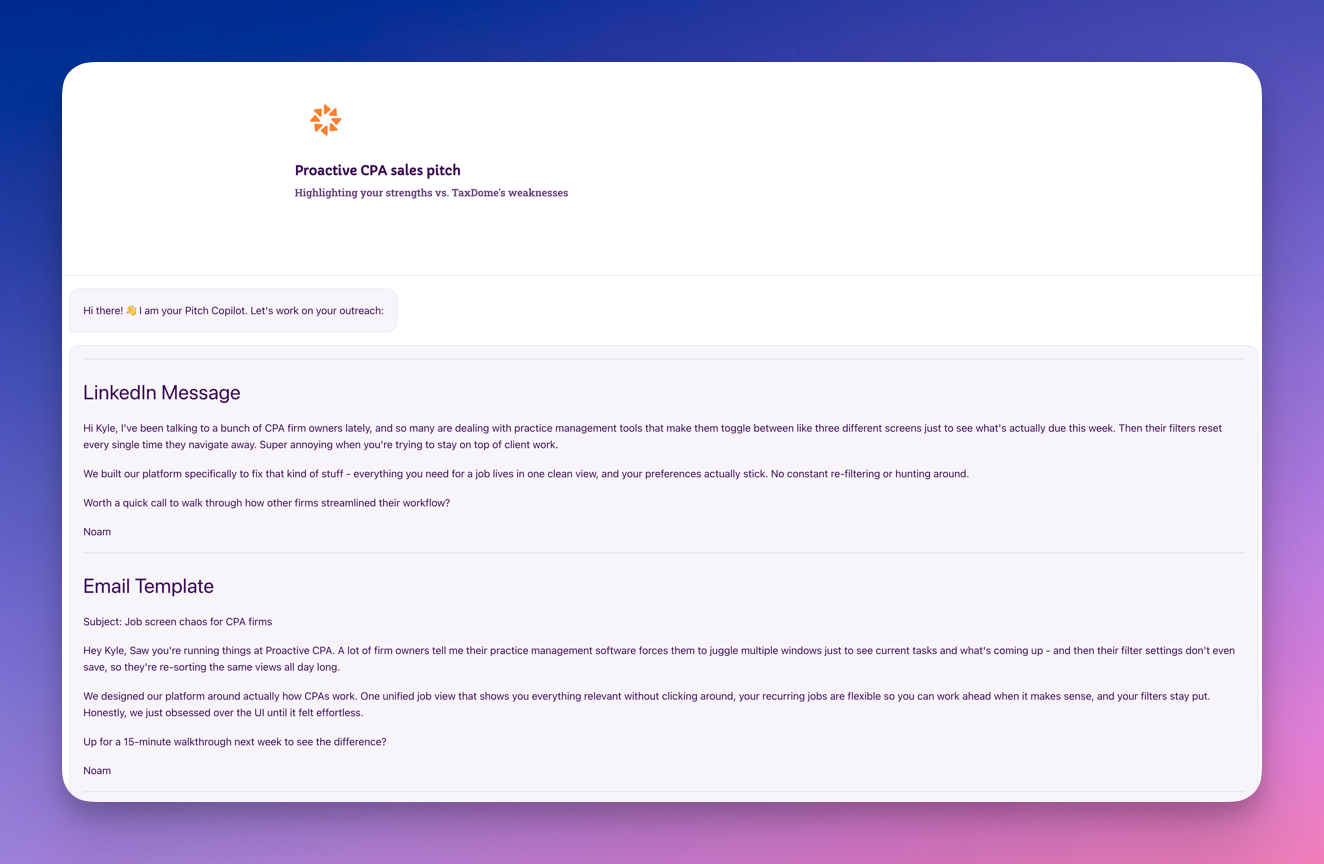
Email Template
A complete cold email including:
Personalized subject line
Opening that references their frustration (without mentioning you saw their review)
Value proposition mapped to their specific pain points
Soft call-to-action
Professional signature placeholder
Character count: Optimized for ~150-200 words - proven to get highest response rates.
LinkedIn Message
A concise message optimized for LinkedIn's format:
Relationship-building opener
Single key differentiator addressing their pain
Low-pressure conversation starter
Under 300 characters for mobile readability
Use case: Perfect for connection requests or InMail outreach.
Sales Call Talking Points
A structured conversation guide including:
Rapport-building openers
3-5 discovery questions specific to their frustrations
2-3 key differentiators to emphasize
Objection handling scripts
Natural closing questions
Use case: Prep for demos, discovery calls, or follow-up conversations.
The Copilot Conversation
Here's where the magic happens. After the initial generation, you'll see a text input at the bottom: "Type your reply here..."
This is your direct line to the AI copilot. You can ask for:
Tone adjustments:
"Make the email more casual"
"This feels too aggressive, can you soften it?"
"The LinkedIn message should be more professional"
Content changes:
"Can you emphasize our mobile features more?"
"Add a line about our customer support response time"
"Remove the part about integrations"
Format variations:
"Give me a shorter version of the email"
"Can you make the subject line more intriguing?"
"Rewrite the opening paragraph to be more direct"
Additional formats:
"Can you also create a follow-up email template?"
"I need a version for reaching out to their boss instead"
"Write a different version for cold calling"
All of these requests are free. You already paid the 1 credit for the initial generation. Refinement and iteration cost nothing extra.
How the AI Works
The Pitch Copilot connects multiple data points:
Their Specific Pain (from the individual review)
"Poor capacity planning" + "Limited resource profiling"
Broader Patterns (from aggregated pain points)
"45% of users also mention reporting limitations" + "32% frustrated with mobile experience"
Your Strength (from your input)
"AI-powered resource allocation with real-time capacity forecasting and mobile-first design"
The Connection (AI-generated)
"I noticed your team works in [industry]. Managing resource allocation without proper forecasting tools can be frustrating - and based on what we're seeing across the market, reporting visibility and mobile access often compound these challenges. We built [product] specifically to solve these exact pain points..."
The result: Outreach that feels personally researched and addresses not just their individual complaint but the broader context of what's wrong with the competitor.
Why Aggregated Data Matters
Individual Alert Context
The specific review gives you the "in" - this person, at this company, is frustrated right now. That's your timing advantage.
Aggregated Patterns Context
The Pain Points Report data shows you're not just solving one person's complaint - you're addressing systemic issues with the competitor. This makes your pitch stronger because:
Demonstrates Market Understanding
"We've noticed teams in your space consistently struggle with X, Y, and Z with [competitor]" sounds informed, not opportunistic.
Builds Credibility
When you can reference broader patterns, you're not just reacting to one review - you're showing you understand the competitive landscape.
Uncovers Hidden Objections
Even if this specific reviewer didn't mention mobile issues, 45% of others did. Your pitch can proactively address it.
Creates Better Discovery Questions
Sales call talking points include questions about common pain points beyond just what this reviewer mentioned.
Best Practices
Start Broad, Then Refine
Don't overthink your initial generation. Get the first draft, see what the AI produces, then use the conversation to dial it in:
Generate with basic product info
Review what comes back
Ask for specific changes: "Make it more technical" or "Add social proof"
Keep iterating until it feels right
This workflow is faster than trying to perfect your input upfront.
Use It Like a Real Copilot
Think of it as collaborating with a sales copywriter who knows:
The prospect's exact complaints
What other customers hate about the competitor
Your product's capabilities
Ask questions like:
"Which pain point should I lead with?"
"Is this too salesy?"
"What objections should I prepare for?"
The AI will respond and adjust accordingly.
Save Winning Patterns
When you land on a pitch structure that works (gets responses, books meetings), note what you asked for. Use similar refinement requests for future pitches with similar prospects.
Test and Iterate
Track which generated pitches get responses. Over time, you'll learn:
Which product descriptions work best
Which pain point mappings resonate
Which CTAs drive action
Which conversational refinements improve results
Use with Other Intelligence
Combine the pitch with:
LinkedIn unlock - See their background before customizing
Buying Committee - Create variations for different stakeholders using the copilot
Pain Points Report - Review the full context the AI is drawing from
Common Questions
Can I regenerate a pitch?
You don't need to. Once generated, you can refine it infinitely through the conversation. Ask for changes, variations, or completely different approaches - all free after the initial 1 credit.
What if I want a completely different approach?
Just tell the copilot: "Start over with a different angle" or "Ignore that version, try emphasizing X instead." No additional cost.
Can I edit pitches after generation?
You can copy the text and edit it in your own tools (email client, CRM, etc.). Or ask the copilot to make the changes for you directly in the interface.
How does the Copilot prioritize which pain points to emphasize?
The AI focuses primarily on the pain points from the specific review (that's what this prospect complained about), then supplements with aggregated patterns when relevant. The goal is personalization first, broader context second. You can always ask it to shift emphasis.
Can my team see generated pitches?
Yes. Once you generate a pitch for an alert, everyone on your team can view it and continue the conversation. The entire thread is saved.
Is there a limit to how many refinements I can request?
No limit. You paid 1 credit for access to the copilot for this alert. Use it as much as you need.
Does it work in languages other than English?
Currently, the Pitch Copilot works best in English. Support for other languages is on our roadmap.
Strategic Usage
Good candidates for pitch generation:
High-value prospects (enterprise, strategic accounts)
Perfect ICP fit with clear pain point mapping
Alerts you're actively planning to pursue
Complex sales requiring multi-channel outreach
Situations where you want multiple variations to test
Skip pitch generation when:
Company doesn't fit ICP (save the credit)
Pain points aren't relevant to your product
You're just gathering competitive intelligence
You already have battle-tested templates that work
Pro workflow:
Review alert, check if company fits ICP
Unlock LinkedIn to confirm person's role
If promising, unlock buying committee
Generate pitch with basic product info (1 credit)
Use copilot conversation to refine for this specific prospect (free)
Create variations for different stakeholders (free)
Customize final versions with personal touches
Send via appropriate channels
Track which approaches convert
This uses 3 credits total but gives you complete intelligence + unlimited pitch variations for a qualified opportunity.
Making It Work
The Pitch Copilot doesn't replace good salesmanship - it amplifies it. You still need to:
Qualify prospects properly
Personalize the final outreach
Follow up consistently
Demonstrate actual value
What it does is:
Eliminate the blank page problem
Ensure outreach starts from verified pain points
Give you unlimited refinement at no extra cost
Let you test multiple approaches without rebuilding from scratch
Provide context from both individual and aggregate frustrations